

This page is intended to help users who are having problems logging into the server and to be able to view forms.
Overview
I
don't know my password, now what?:
TroubleShooting
I
login, but I still Can't view any Forms
I
don't know my password, now what?
How to contact your Association Administrator
Troubleshooting:
I login, but I still
Can't view any forms:
The most common problem,
are cookies, and Javascript. A lot of people turn these off, and from what we have seen,
AOL turns them off by default. So the first thing you should check is your
settings/preferences. You may also configure your browser to use the adobe plug-in to view the forms. To find out how to check your settings Click on the
Browser below that you are using:
Netscape
4.x Settings
Microsoft
Internet Explorer
Other common problems are with Adobe Acrobat. Make sure
you have the latest version installed on your system. You can download the latest version for free
here. There are also some problems with the Adobe Acrobat plug-in and Netscape.
If you continue to have problems while using netscape, I'd suggest trying Internet Explorer 5.5 or greater.
You must have your login and password assigned to you from your Region's System Administrator. You can request a login by going here
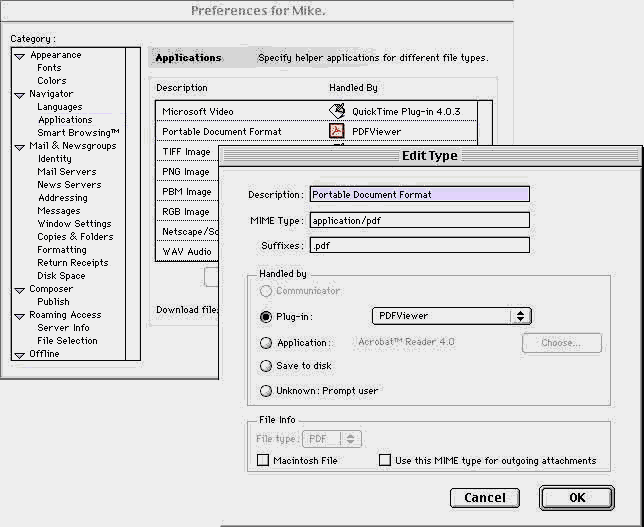
Netscape 4.x Settings for Macintosh:
Click on ‘EDIT’ and Select ‘Preferences’
Find ‘Navagator’ and select ‘Applications’
As you see below you should have a file called ‘Portable Document Format’
If not you will need to create one!
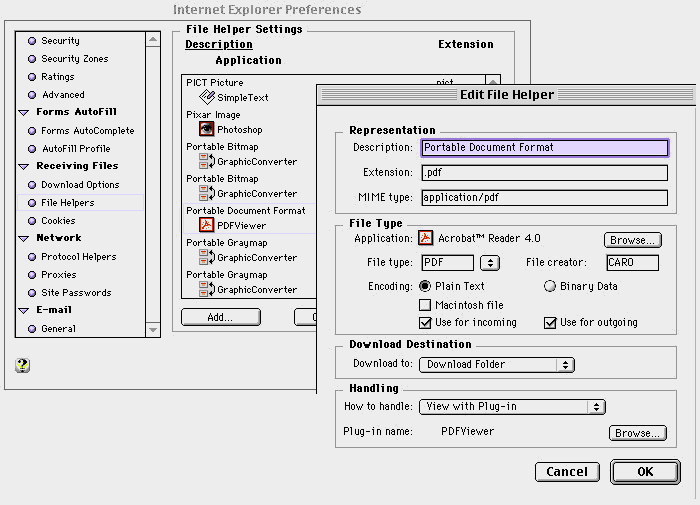
Microsoft Internet Explorer 4.x Settings for Macintosh:
Click on ‘EDIT’ and Select ‘Preferences’
Find ‘Receiving Files’and select ‘File Helpers’
As you see below you should have a file called ‘Portable Document Format’
If not you will need to create one!
Still need more Help? Try E-Mailing your Association Administrator.
[ Return to the Forms List ]